
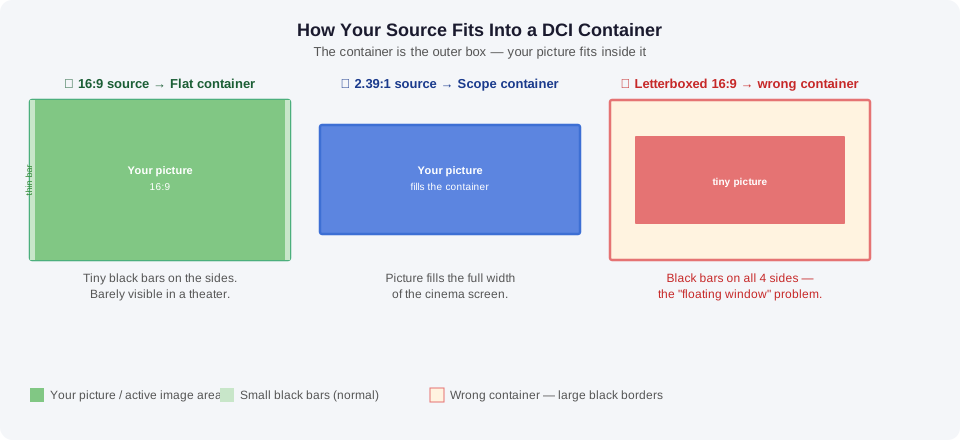
Every DCP must be packaged in one of two containers: Flat or Scope. These aren’t creative choices — they’re technical specifications that determine how your film is projected in the cinema. Choose the wrong one and your film could screen with unintended black bars, a distracting “floating window” effect, or even get rejected by a festival.
Not sure whether your film is Flat or Scope?
You don’t need to figure it out yourself. When you order from Pure DCP, we check the actual image area and package the DCP correctly.
This guide explains what the two containers are, which one your film belongs in, and what happens with common tricky cases like letterboxed 16:9 files — in plain language, without a film school degree required.

The Two Containers: Flat and Scope
Think of Flat and Scope as two standard-sized frames that every cinema projector in the world is built around. Your film — whatever shape it is — gets placed inside one of these two frames for delivery.
Container | Shape | Pixel size (2K) | What it looks like |
|---|---|---|---|
FLAT |
1.85:1 |
1998 × 1080 |
Slightly wider than a 16:9 TV screen |
SCOPE |
2.39:1 |
2048 × 858 |
Ultra-wide cinematic format — about a third wider than Flat |
There is a third format called Full Container (1.9:1) but it is not supported by most cinema projectors and should never be used for festival or theatrical delivery.
Why only two options? Cinema projectors run preset modes — either Flat or Scope. When a projectionist receives your film, they select one of those two presets, which controls the lens and the physical masking curtains that frame the screen. There is no “custom” mode for other shapes.
Which Container Does My Film Use? Quick Reference
Here is how common source formats map to the correct DCI container. If you shot in one of these formats, this is the answer:
Ratio | Common name | Container | What hapens |
|---|---|---|---|
1.33:1 |
4:3 (old TV format) |
FLAT |
Pillar-boxed — black bars on sides |
1.37:1 |
Academy ratio (classic film) |
FLAT |
Pillar-boxed — black bars on sides |
1.66:1 |
European widescreen |
FLAT |
Slight pillar-boxing on sides |
1.78:1 |
16:9 (HD / standard video) |
FLAT |
Tiny pillar-boxing — barely visible in theater |
1.85:1 |
DCI Flat (cinema standard) |
FLAT |
Perfect fit — fills the container edge to edge |
2.00:1 |
2:1 (RED camera native) |
SCOPE* |
See note below — judgment call |
2.20:1 |
70mm / roadshow widescreen |
SCOPE |
Slight pillar-boxing on sides |
2.35:1 |
Older anamorphic widescreen |
SCOPE |
Minimal — virtually invisible in theater |
2.39:1 |
DCI Scope (cinema standard) |
SCOPE |
Perfect fit — fills the container edge to edge |
2.40:1 |
Common modern anamorphic |
SCOPE |
Minimal difference from 2.39 — no visible change |
* 2:1 is a known edge case — see the section below.
Not sure where your film falls? When you order from Pure DCP, we determine the correct container for you based on the actual picture content of your file — not just the file dimensions. If your situation is ambiguous, we will contact you before encoding to confirm.
The Most Common Mistake: The Letterboxed 16:9 Source File
This is the single most frequent aspect ratio situation we see in submitted source files, and it is easy to get wrong if you are not careful.
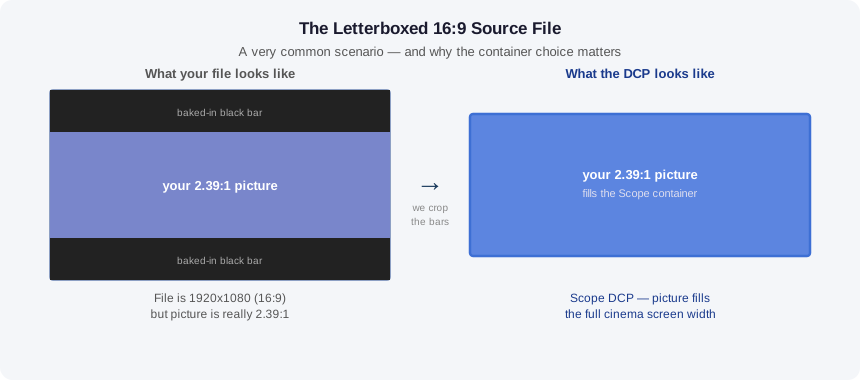
Here is the scenario: A filmmaker shot in standard 16:9 video, then in editing added black bars to the top and bottom of the frame to create a wider, more cinematic look — commonly 2.39:1. The finished export file is the standard 1920×1080 size, but only the middle strip of the frame contains actual picture. The black bars are baked into the file.
The wrong approach: Putting this file straight into a Flat container. From the file’s perspective, it is 1920×1080 (16:9), so Flat seems correct. But the actual picture inside it is 2.39:1 — and when that gets projected, the theater sees a 2.39 image squeezed inside a Flat container, with black bars on all four sides. The picture ends up floating in the center of the screen, significantly smaller than it should be. This is called the “floating window” problem.
The correct approach: Recognizing that the film’s true aspect ratio is 2.39:1, placing it in a Scope container, and cropping the baked-in black bars so the actual picture fills the container correctly. The result is a properly mastered Scope DCP that projects exactly the way the filmmaker intended.
When you order from Pure DCP, we identify this situation and handle it correctly. You do not need to re-export your source file.
Edge Case: The 2:1 Aspect Ratio
2:1 has become more common in independent filmmaking, particularly from RED cameras and certain iPhone shooting modes. It sits awkwardly between Flat and Scope and requires a judgment call:
- In a Flat container: The image will be letterboxed with visible black bars above and below. On a Flat screen this is somewhat contained, but on a Scope screen it compounds into a noticeably small projected image.
- In a Scope container: The image will be pillar-boxed with black bars on the sides. Since Scope screens are wide, this is less intrusive than the letterboxing alternative.
The general industry recommendation for 2:1 is a Scope container, since most festival and theatrical venues are Scope screens or can accommodate Scope with minimal visible impact. We will apply this by default unless you specify otherwise.
You Don’t Need to Figure This Out Yourself
Most filmmakers submitting to festivals are not DCP engineers — and they shouldn’t have to be. When you submit your source file to Pure DCP, we determine the correct container based on the actual picture content of your file.
This matters most in situations like the letterboxed 16:9 file described above, where the file dimensions suggest one container but the actual image content requires another. We identify the true picture area and master the DCP accordingly.
If you have a strong preference for Flat or Scope — perhaps your film is intentionally non-standard and you want it presented a specific way — just include a note with your order and we will follow your instructions. Otherwise, we make the call and we will contact you if there is any genuine ambiguity before encoding.
Frequently Asked Questions
What is the difference between Flat and Scope in a DCP?
Flat (1.85:1) and Scope (2.39:1) are the two standard containers for cinema projection. Every DCP must be packaged in one of these two formats. Flat is similar to a slightly wider version of a standard widescreen TV image. Scope is the ultra-wide cinematic format most associated with epic films and big-screen experiences. The choice determines which projector preset and screen masking the theater uses for your screening.
My film is 16:9 — does it go into Flat or Scope?
A true 16:9 file with no baked-in black bars goes into a Flat container. The 1.78:1 image sits inside the 1.85:1 Flat container with a very small amount of pillar-boxing on the sides — so thin it is barely noticeable in a theater. However, if your 16:9 file has baked-in black bars making the actual picture 2.39:1, it should go into a Scope container with the black bars cropped out during encoding.
Do I need to specify Flat or Scope when I order?
No — Pure DCP determines the correct container for you based on your source file. If your situation is unusual or you have a specific preference, add a note to your order and we will follow your instructions. We will always contact you before encoding if there is genuine ambiguity.
What is a 'floating window' in cinema projection?
A floating window occurs when a film ends up in the wrong container — for example, a 2.39:1 image placed inside a Flat container and projected on a Scope screen. The result is black bars on all four sides of the image, with the picture appearing to float in the center of the screen. It is a mastering error that is distracting for audiences and reflects poorly on the film. It is also one of the most common reasons a DCP gets flagged by a festival technical reviewer.
Does aspect ratio affect DCP pricing?
No. Pure DCP pricing is based on runtime and resolution (2K or 4K), not aspect ratio. Whether your film is Flat or Scope, the price is the same.
My film is 2.35:1, not exactly 2.39:1 — does that matter?
No. 2.35:1 goes into a Scope container. The slight difference means there will be very thin pillar-boxing inside the container — barely visible in a theater — and this is completely standard practice. Most films labeled 2.35:1 from the anamorphic era were effectively projected at 2.39:1 anyway due to lens tolerances.
Ready to Order Your DCP?
Submit your source file at puredcp.com/order-dcp. Add a note in the comments if you have specific aspect ratio requirements or preferences and we will confirm the plan before encoding. Digital delivery and 6 months cloud storage included with every order.
Questions about pricing? Contact us at info@puredcp.com or call 818-843-1262.